
Clarity Before Care.
Vision insurance verification, made clear.
Let patients start before their visit. Give your front desk a clear view of benefits and what to do next.
Built from two decades of hands-on experience in optometry.


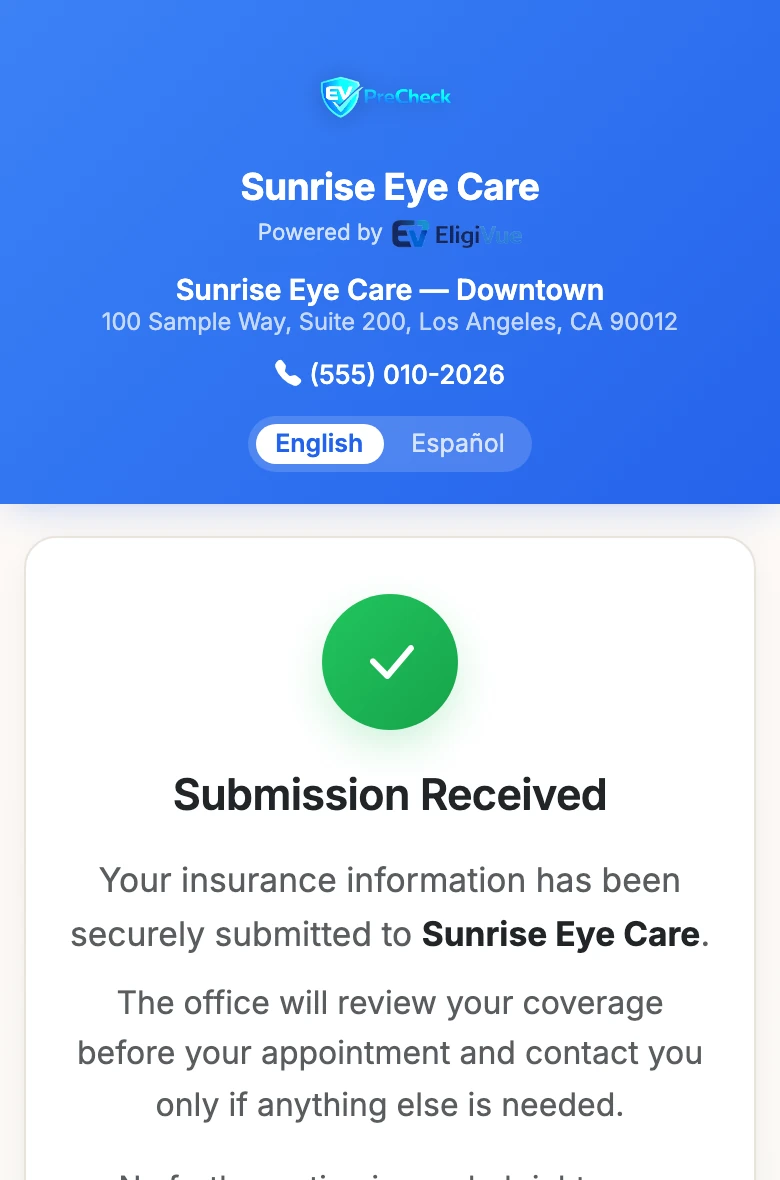
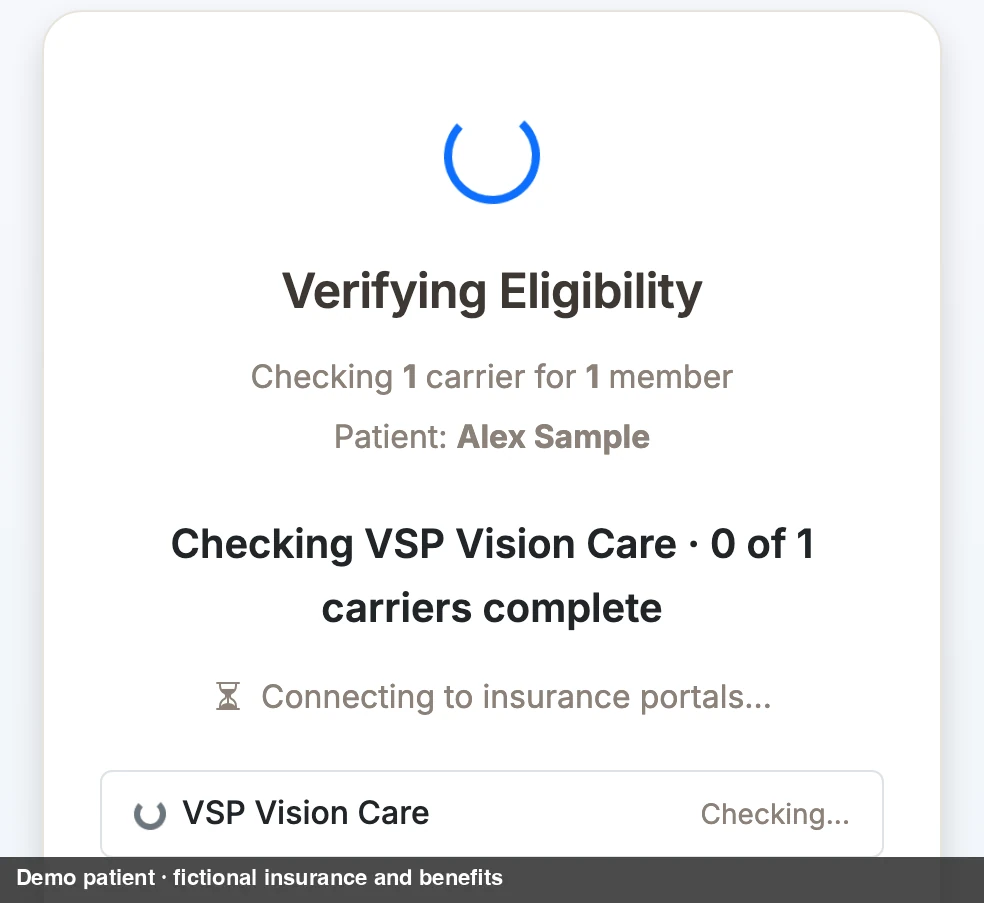
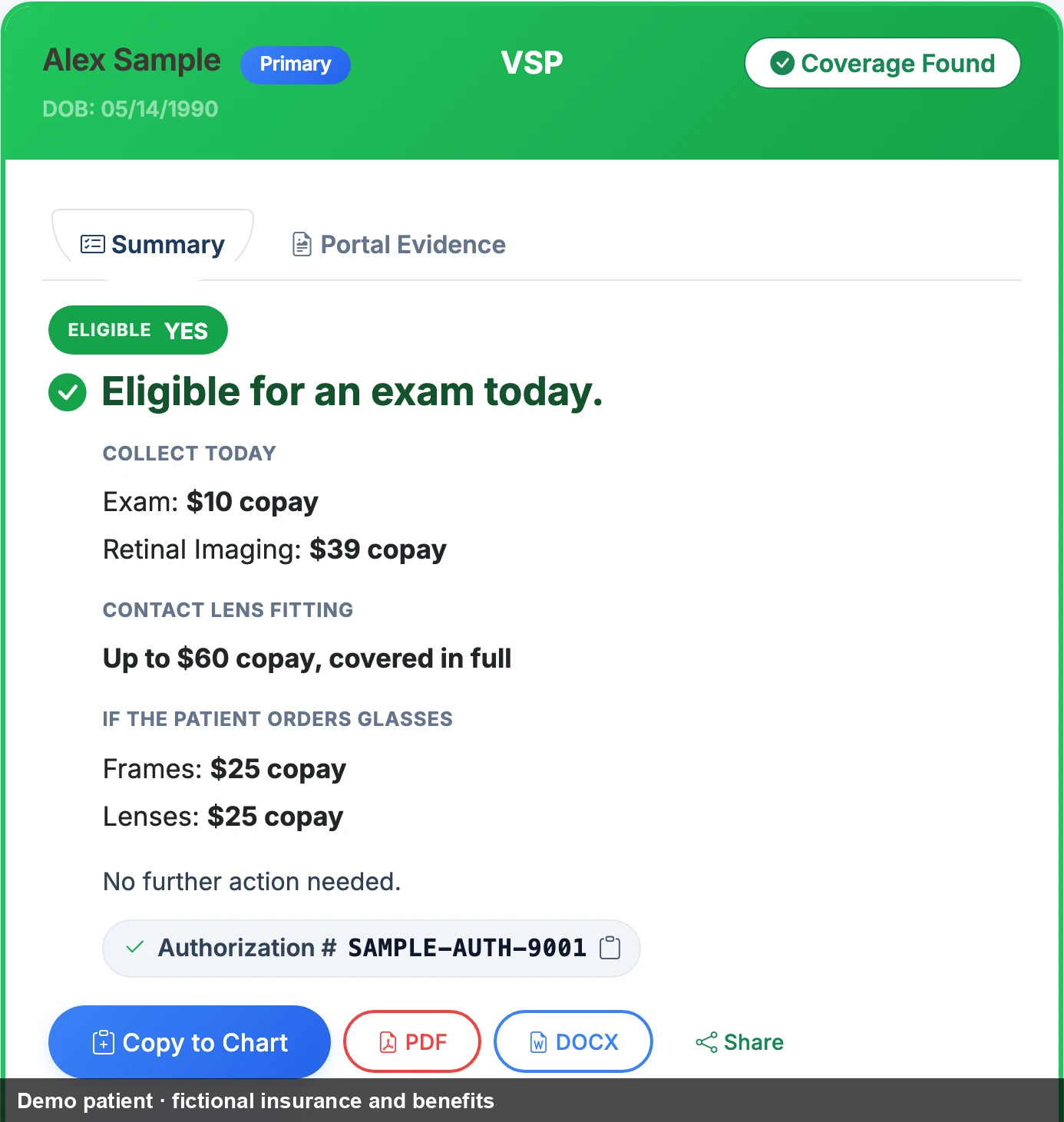
Real product screens on a sample office. Demo patient · fictional insurance and benefits. The three states are shown side by side; no timing is implied.
- VSP
- EyeMed
- Spectera
- Davis Vision
- Superior Vision
- MetLife Vision
MetLife Vision plans are verified through the network that administers them: VSP Choice, Davis Vision, or Superior Vision.
A better visit starts before check-in.
Patients submit their insurance from their phone before the visit. Your front desk sees the submission, then the carrier-verified result.
Share your location’s PreCheck link or QR code. Everything else arrives in the EV PreCheck inbox.
Good to know
- Submitted is not verified. The patient’s confirmation says the office will review their coverage. The verification happens on your side.
- Private by default. Name, date of birth, Member ID or last 4 of SSN, and an optional card photo go in from the patient’s phone, in English or Spanish. Nothing said out loud at the desk.
- You share the link. EligiVue doesn’t text or email patients on its own.
- Included in Practice and Practice Plus.


One familiar results view
Every result is laid out the same way.
PreCheck, Instant, or a recheck from EV Tracker: the presentation is consistent, so staff read it the same way every time. The outcome is whatever the carrier returned.
- SummaryCoverage Found. Eligible YES. “Eligible for an exam today.”
- What to collectCollect Today, then If the patient orders glasses. Copays as the carrier returned them.
- Save or share the resultCopy the summary into the patient’s chart, download a PDF or DOCX, or share the result. An authorization number appears when the carrier provides one.
- BenefitsExam, Contact Lens Fitting, Retinal Imaging, Frames, Lenses, Contacts. “Not shown by carrier” when the portal didn’t return it; never a guess.
- Evidence and recordPortal Evidence, All Portal Fields, and the Verification record with the time it was verified and how long it took.

Know whose benefits are coming due.
EV Tracker turns the next-eligible dates carriers return into one worklist: Eligible Now, Eligible Soon, Future Eligibility. When a date arrives, Recheck Today confirms it with the carrier before anyone picks up the phone.


Good to know
- In-app, on purpose. EV Tracker is a worklist and a sidebar badge. It does not email or text patients or staff.
- Practice Plus. The full worklist and its actions are part of Practice Plus. Practice includes a preview with counts only, so you can see follow-up opportunities building before you upgrade.
Patient Profiles
Returning patient. Familiar information.
Every completed check saves a Patient Insurance Profile automatically. Search Patients by name to open their latest verification or run Check Now.
Click Patients at the top of any page and search by name.
Good to know
- Last verified is history: when coverage was last confirmed and with which carrier.
- Next eligibility is the carrier’s forecast, shown separately, never dressed up as current coverage.
- No save step. The profile panel appears on every completed result, PreCheck or Instant.


Less retyping. Easier follow-up.
Enter the patient’s details.
Enter their name, date of birth, and member ID or last four of SSN to run a new verification.
Search a name. Find their record.
Find a returning patient, open their latest saved verification, or run Check Now, without re-entering their insurance details.
Run a fresh check. No retyping.
Click Recheck Today to verify current benefits using the patient’s saved information.
Instant
One place to check vision benefits.
For walk-ins, phone calls, or anyone who skipped PreCheck: one form checks every carrier the office has connected and returns the same familiar result.
Enter name, date of birth, and last 4 or Member ID. Pick a carrier for a faster check, or leave All Carriers selected.
Good to know
- Staff stay with the patient. The page shows “Verifying Eligibility…” and which carriers are being checked while the portal round-trip runs. The time it took is printed on every result’s Verification record.
- If a carrier asks for a sign-in code, staff see which carrier needs it, and the other carriers’ results still come back. Staff complete the sign-in and re-check just that carrier. The signed-in session is reused afterward.
- Included in Practice and Practice Plus. Unlimited single-patient checks on both.

Verifying Eligibility...
Checking your connected carriers
Staff see a live elapsed-time counter here. No duration is shown in this illustration.

Supporting features
More for the whole office.
Tools to help your whole office prepare, follow up, and stay organized.
Batch verification
Upload a CSV of up to 20 patients (dependents count toward the limit) and let the checks run in the background. Results use the same vocabulary as every other check: Found, Not Found, Review Needed, Action Needed.
Details
- Batch covers VSP, EyeMed and Spectera. For Davis Vision and Superior Vision, use Instant or EV PreCheck.
- Staff step in when a portal asks for a code or a result needs review.
ROI Dashboard
Estimate time and labor savings using your office’s verification activity.
Details
- The labor rate and minutes-per-manual-check are editable settings. The defaults are $25 per hour and 5 minutes per check; they are an estimate, not a guarantee.
- Patients verified, portals searched, and completion rate for the last 30 days.
Advanced Analytics
Team performance and trends over time, with CSV export.
Details
- Practice includes the ROI Dashboard. Practice Plus adds the Advanced Analytics page and its exports.
- Practice Plus also includes the estimated patient cost table: retail, copay, and patient responsibility on a result.
Multi-location and team
Practice includes 5 users and one location; Practice Plus includes 10 users. Add locations on either plan, each with 5 more users.
Details
- Additional locations at founding pricing: $149/mo on Practice, $199/mo on Practice Plus. Additional users $10/mo each.
- Each location has its own PreCheck link and can use its own portal credentials or share the office’s. Staff see only the locations they’re assigned to.
- Shared front-desk workstations: switch user with a personal PIN.
Chart-ready notes, exports, history, and evidence
Copy chart-ready notes formatted for Officemate, RevolutionEHR, Crystal PM, or plain paste. Every result exports as PDF or DOCX, and a Verification Record PDF keeps the carrier’s portal evidence with it.
Details
- Verification History is searchable and exports to CSV; it is retained for the life of your account, including portal evidence.
- Nothing to install or connect: EligiVue works alongside your practice management system.

Full plan comparison on the pricing page.
See EligiVue in action.
1:36
One patient’s PreCheck from phone to chart, then EV Tracker, Patients, and an Instant check. Every screen is the real product on a sample office.
How an office gets started
Nothing to install. Nothing to replace.
EligiVue works alongside your practice management system. Three steps from request to first check.
Request access
Tell us about your practice. EligiVue reaches out to confirm fit, setup needs, and launch timing. No card, no contract to start.
Sign the BAA, connect your portals
A Business Associate Agreement is signed before any eligibility check runs. Then your carrier portal logins go into Settings, with guided setup for staff access and PreCheck.
Share your link, run your first checks
Put the PreCheck link or QR code where patients will see it. Run Instant checks at the desk from day one.
What you can rely on
A record you keep, handled the way an office needs.
Every verification, kept
- Retained for the life of your account, including the carrier’s own portal evidence.
- A Verification Record PDF: who was verified, when, which carrier, and the supporting evidence.
- Benefits are what the carrier’s portal returned at the time of the check. Always confirm anything unusual with the carrier before billing.
Handled carefully
- Designed with HIPAA Security Rule requirements in mind. Patient data, portal credentials, and portal evidence are encrypted with AES-256; all traffic uses TLS.
- Role-based access, session timeouts, audit logging, and optional authenticator-app two-step sign-in for admins and managers.
- A signed Business Associate Agreement is required before any eligibility check runs.
Built at the front desk of an optometry practice.
I know how much work happens before the exam.
Nic Camuccio
Founder, EligiVue
Business Administration, USC’s Marshall School of Business
I started working in my family’s optometry practice in Los Angeles in 2006 and took over day-to-day operations in 2010 while attending college. Over the years, I managed staffing, scheduling, insurance and the front desk as the practice grew from four to ten doctors. In 2025, I led the operational launch of The Village Optometry, including insurance credentialing, staff onboarding and EHR setup.
I saw how much work went into answering a simple question: “Can this patient use their vision benefits?” Staff collected insurance details, moved between carrier portals and pieced together different benefit screens—all while answering phones and checking patients in. Afterward, someone still had to document the result. When a patient wasn’t eligible yet, the future date often went nowhere. We didn’t have a reliable system to track it and follow up, and patients were left to remember on their own.
I built EligiVue to move that work ahead of the visit.
EV PreCheck lets patients submit their insurance information from their own phone through your office’s link or QR code. EligiVue then checks the configured carriers, giving your team results to review before the patient arrives. Staff can see what coverage was found and what still needs attention—so insurance questions can be addressed before they become a delay at check-in.
For walk-ins and phone calls, Instant brings carrier checks into one place. Results follow a consistent layout, with carrier evidence and summaries staff can copy into the chart.
EV Tracker gives those dates a place to go. It organizes the future eligibility dates carriers return into a follow-up list, so your team can recheck benefits and contact patients when the time comes. Instead of leaving patients to remember, your office has a clear opportunity to bring them back.
Less time navigating insurance, less repeated work, and more time helping patients.
I’m personally involved in setup and support for our founding offices. I’ll walk you through EligiVue using the workflows that matter to your practice.
Pricing
Founding price, locked for 24 months.
The first 10 founding offices lock in founding pricing for two years and receive a 30-day free trial with full Practice Plus access. No credit card required.
- Full Practice Plus access
- Up to 10 staff users
- Founder-led setup support
- EV PreCheck and Instant verification
- Unlimited single-patient checks, all six carriers
- Batch, Verification History, ROI Dashboard, EV Tracker preview
- 5 users, 1 location
- Everything in Practice
- Full EV Tracker: the worklist and its actions
- Estimated patient cost table, Advanced Analytics, audit log exports
- 10 users; additional locations +$199/mo each
Before you decide
Questions offices ask.
How does the free trial work?
How long does a verification take?
Does EligiVue text or email my patients?
What is the difference between EV PreCheck and Instant?
What does “Due for Recheck” mean in EV Tracker?
Which carriers are supported, and what about MetLife?
Do I need to change or connect my practice management system?
What happens if a carrier asks for a 2FA code?
How does EligiVue support HIPAA-regulated workflows?
Is the benefit information guaranteed?
How long are verification records kept?
Still have questions? Email support@eligivue.com. We aim to respond within one business day.
Founding Office Program
Less time in portals. More time with patients.
Request access, and EligiVue will reach out to confirm fit, setup needs, and launch timing.
Request Founding Office AccessLimited to 10 practices · 30-day trial · No credit card required